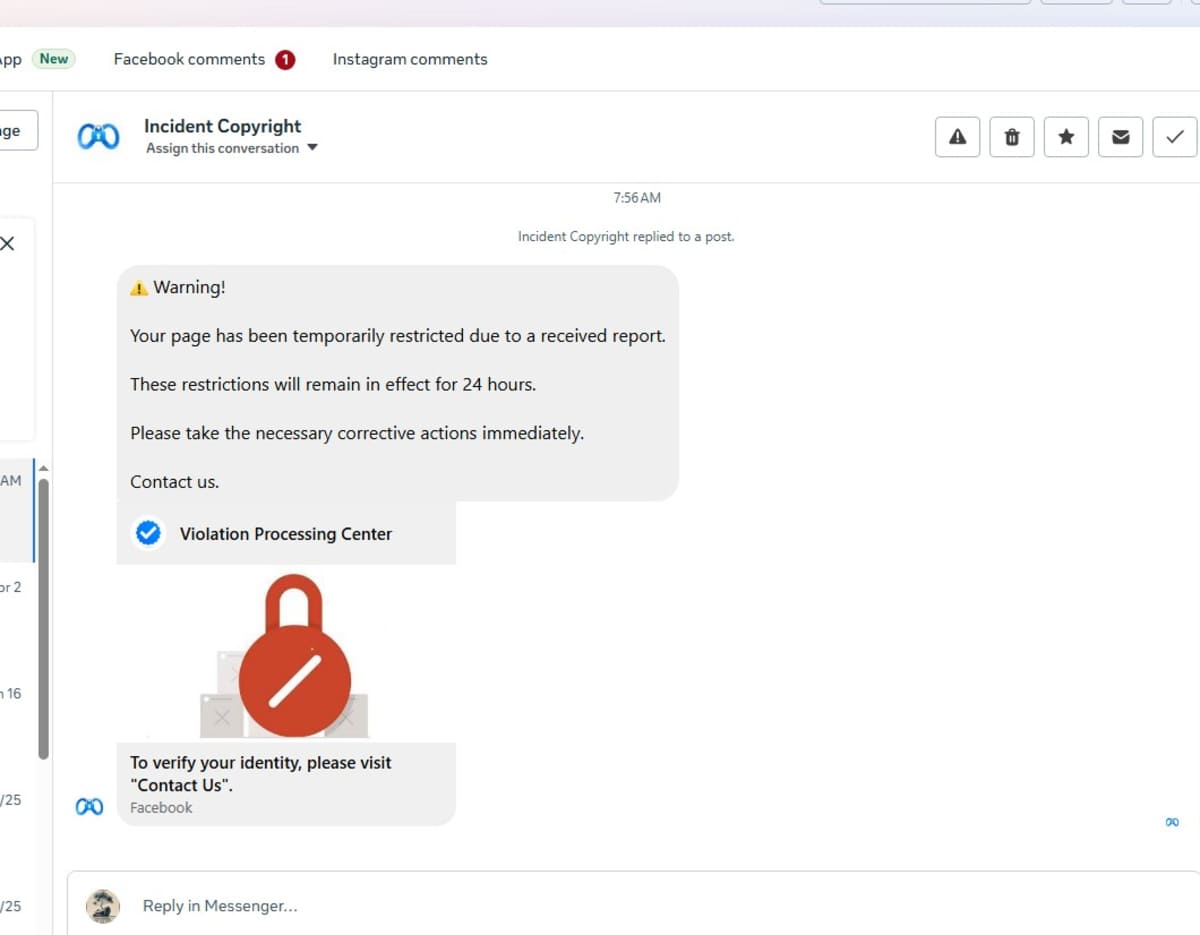
I received the message below this morning claiming my Facebook page had been "temporarily restricted" and that I needed to click a "Contact Us" link to verify my identity.
It looks convincing at first glance.
It isn't.
This is almost certainly a phishing scam designed to steal Facebook login details from page owners.
Here are the warning signs:
🚩 It arrived via Messenger rather than an official Meta notification.
🚩 It uses fear and urgency:
"Your page has been temporarily restricted..."
Scammers want you to panic before you think.
🚩 It tells you to click a "Contact Us" button instead of directing you to Facebook's official support pages.
🚩 The link preview uses a URL shortener instead of an official Meta address.
🚩 The sender's name sounds official ("Violation Processing Center" / "Incident Copyright"), but anyone can create a page with an official-sounding name and logo.
If you receive one of these messages:
❌ Don't click the link.
❌ Don't enter your Facebook password anywhere.
❌ Don't upload identification documents.
Instead:
✔ Check your Page Quality and Account Quality directly inside Facebook.
✔ Open Meta Business Suite yourself instead of following links in messages.
✔ Report and block the sender.
Remember
If Facebook genuinely needs to notify you about a policy violation, you should be able to see the notification after logging into your account normally. Never trust a Messenger message simply because it contains Facebook logos or uses official-looking language.
Scammers know that business owners worry about losing access to their pages. They use that fear to trick people into handing over their accounts.
Stay sceptical. It could save your page.
Website Version
Facebook "Your Page Has Been Restricted" Scam Warning
A new phishing scam is targeting Facebook page owners with messages claiming their page has been temporarily restricted due to a report.
The message typically instructs the recipient to click a "Contact Us" button to verify their identity. In reality, the link leads to a fake website designed to steal Facebook login credentials.
Common warning signs
- The message arrives through Messenger.
- It creates urgency by claiming your page is restricted.
- It asks you to verify your identity immediately.
- It links to a shortened or unfamiliar web address.
- It comes from pages with official-sounding names rather than Meta's official support channels.
How to protect yourself
Never click links in unsolicited Messenger messages claiming to be from Facebook.
Instead:
- Log in to Facebook normally.
- Check your Page Quality and Account Quality sections.
- Access Meta Business Suite directly from your browser or app.
- Report and block suspicious accounts.
Phishing scams succeed because they create panic. Taking thirty seconds to verify a message independently can prevent your Facebook account from being stolen.